After refreshing the page, all my posts are gone—what happened?
The tool does not store analyzed publications on its server. All retrieved data is stored in the browser’s temporary memory and is cleared immediately upon page refresh. This approach helps prevent additional server load and allows us to keep our plans unlimited.
How to monitor subscriber growth for specific dates?
Unfortunately, this is not possible with the current tool. Popsters analyzes only posts and does not continuously track metrics. Implementing such a feature would necessitate a pricing model based on each analyzed page rather than the entire social network as it operates now.
Why is social media authorization necessary instead of logging in with an email address?
The tool obtains data from social networks through this authorization method. This functionality enables the analysis of closed pages on platforms like VKontakte and Odnoklassniki, where possible, as well as access to regional data on Facebook using the same display parameters set within the network itself.
Our tool offers unlimited tariffs, and email authorization would restrict our ability to provide unrestricted analytical capabilities.
Moreover, in many cases, social media authorization is more convenient, requiring only a single click on the social network icon.
Why can’t I analyze more than 10 pages at once?
Since all data is analyzed and collected directly in the browser, performance limitations may arise when handling a larger number of pages.
You can analyze more than 10 pages sequentially; however, it’s not possible to display them simultaneously in the feed and on the graphs.
Paid for a personal plan, but there is no access. Why?
Paid access does not simply disappear. If you encounter any issues, there are two possible reasons:
1. You may have accidentally paid for access to the wrong social network. You can check this by reviewing the receipt sent to your email (if you provided one during payment) or by accessing the user panel, where all authorized profiles and active access will be listed. If this is the case, please reach out to our technical support email with the details of the payment and the desired transfer of access, and we will assist you.
2. Access might have been paid for a different profile on the social network. This can occur if you initially paid for access and later logged in with a different profile. In this situation, please contact our support email with the exact date and time of your payment (or attach the receipt), and we will help you identify which profile has active access.
Authorization security
Analysis of pages within the tool is only possible after authorization through social network accounts. Popsters utilizes OAuth 2.0 authorization for all networks except Telegram. This protocol ensures a completely secure authorization process, as it does not transmit sensitive information such as email addresses or passwords to the tool. The tool only receives the necessary permissions required for its functionality, effectively eliminating the risk of hacking or unauthorized access.
For Telegram, authorization is conducted using a unique code, similar to the process in the messenger itself. This code is valid for one-time use only for authorizing in the tool and cannot be utilized in other applications or contexts.
How to view likes excluding ads?
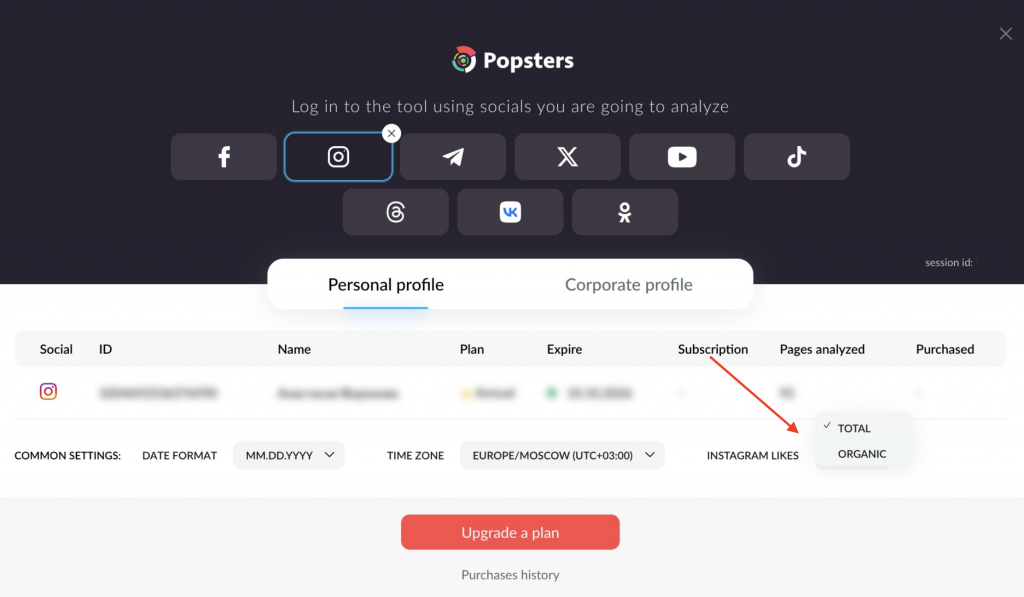
Now in Instagram analytics, you can switch between like display modes — total and organic. The toggle is in the user panel.
Total — all likes on a post, including those received from ads and integrations. Suitable when you need to evaluate the overall effectiveness of a post.
Organic — only likes without paid promotion. Helps to understand the real engagement of the audience and the quality of content.
After switching, the data on charts and metrics is recalculated automatically; no need to refresh the page. The selected mode is also taken into account when exporting reports.